Airbnb Guest Invoice on the Finanças Portal in Portugal (2026 Guide)

If you run an Airbnb or Alojamento Local (AL) property in Portugal, you need to create invoices known as Faturas ou Faturas-Recibo on AT per guest booking payout from a platform like Airbnb or Booking.com
While many hosts use invoicing software such as Vendus, you can also issue invoices directly through the Portuguese Tax Authority (AT) website at no additional cost.
In this guide, we'll walk through the entire process of creating a guest invoice (Fatura-Recibo) on the Portal das Finanças, including what information to enter and how to handle tourist tax.
How to Create an Invoice on Portal das Finanças (AT)
Step 1: Log in to Portal das Finanças
Go to the AT portal and sign in using:
NIF and password
Cartão de Cidadão
Chave Móvel Digital
Once logged in, access:
Search for "Fatura" using the search bar. Click the search icon to proceed.

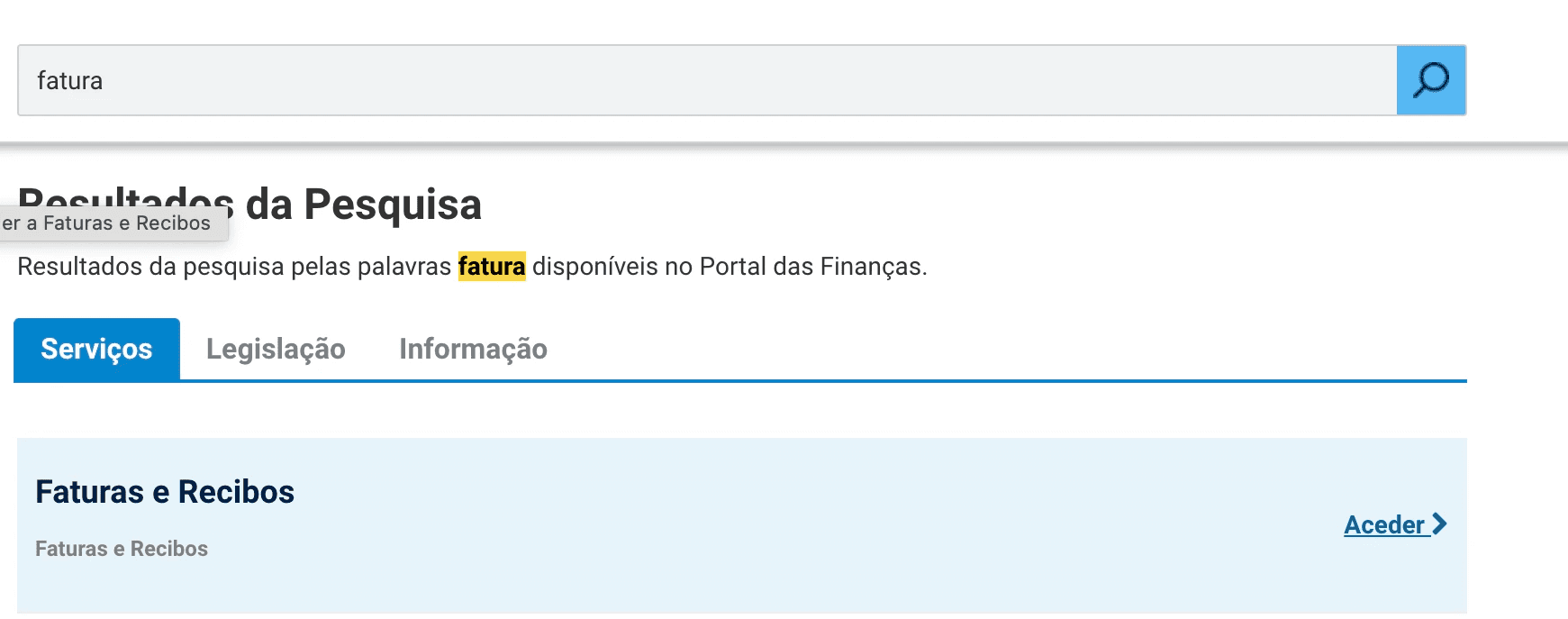
Select Faturas e Recibos by clicking the action link on the right "Aceder"
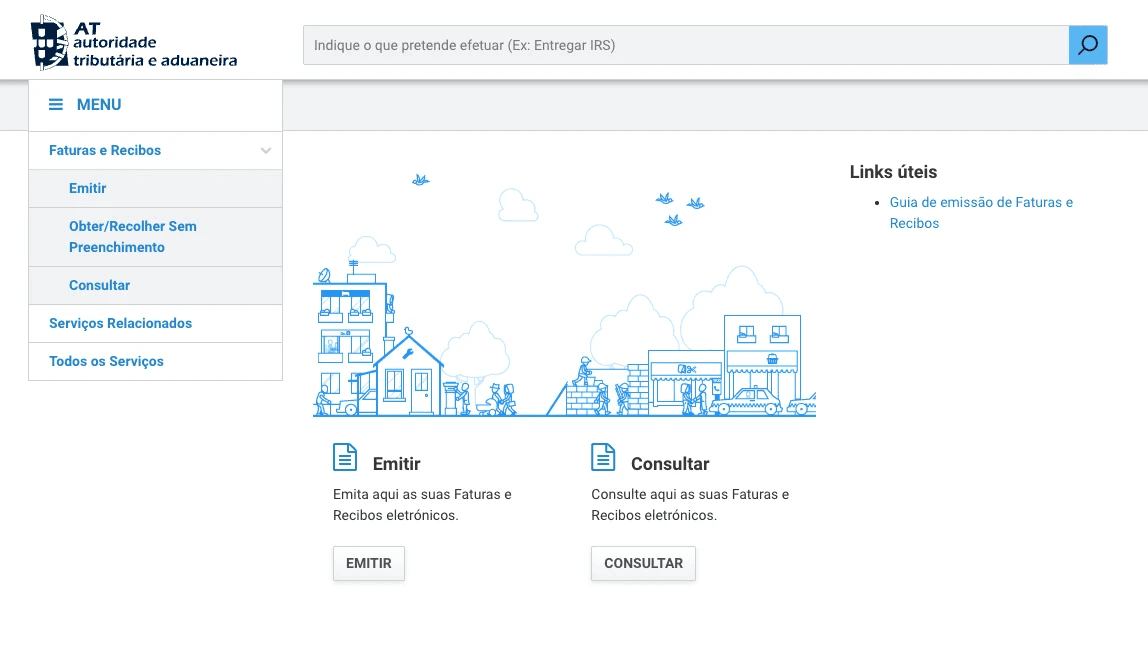
Once the new page loads , Click "Emitir".
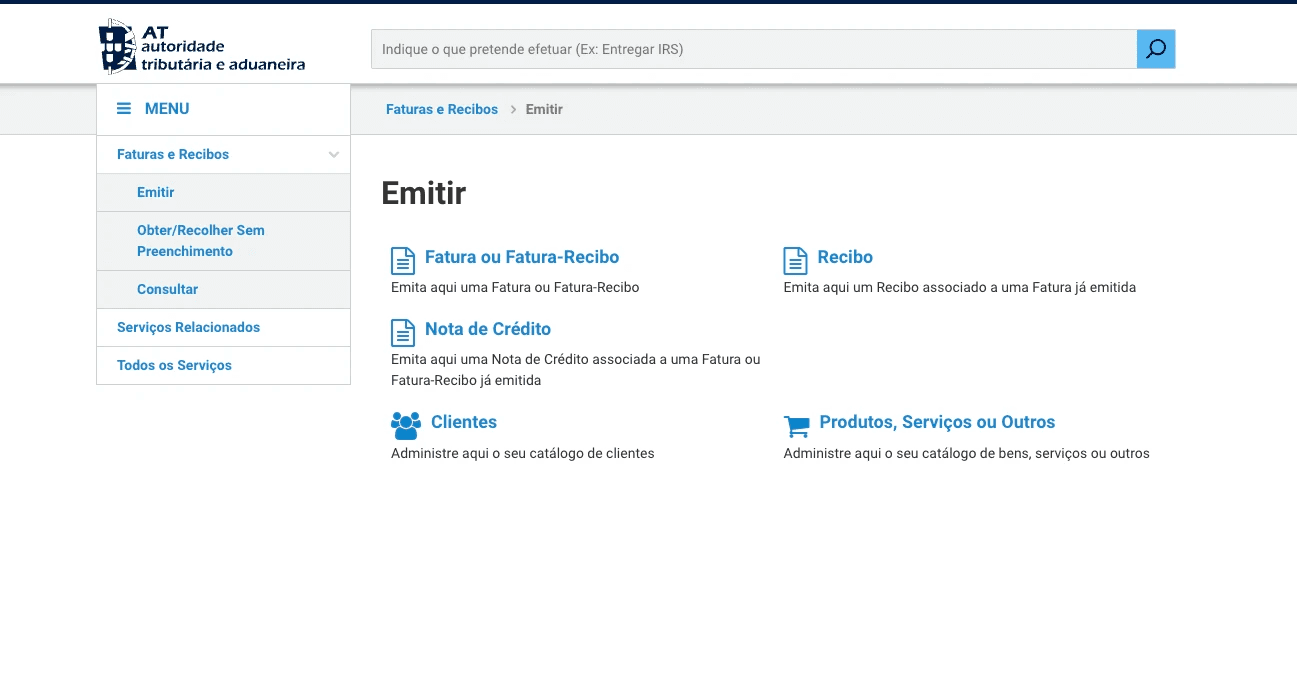
After the page loads, select Fatura ou Fatura-Recibo
Step 2: Choose the Document Type
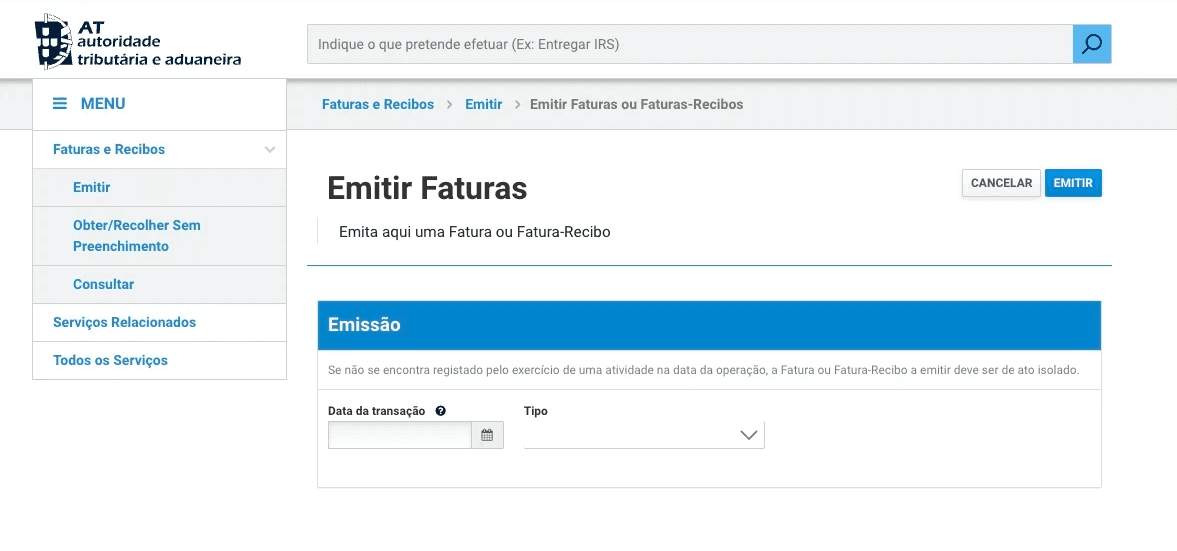
A new page will open called "Emitir Faturas".
Under "Tipo", select: Fatura-Recibo.
What is a Fatura-Recibo? It is normally used for Airbnb or Booking.com bookings because they have already collected the payment from the guest and transferred it to you.
Information You'll Need Before Creating the Invoice
Prepare:
Guest name
Guest country of residence
Guest tax number or passport / ID number
Reservation code or any reference
Check-in date
Check-out date
Accommodation amount
Tourist tax amount
AL licence number
Step 3: Fill in the Guest Information (Adquirente)
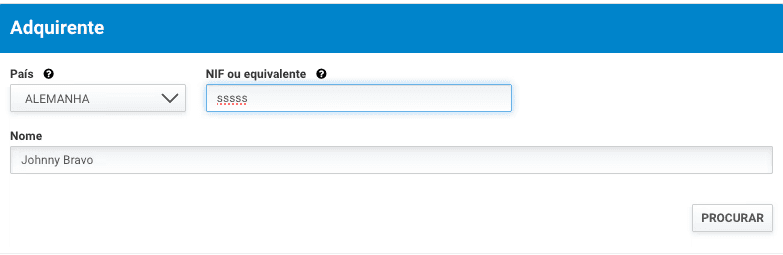
País
Select the guest's country.
NIF ou equivalente
For foreign guests without a Portuguese tax number, enter their foreign tax number or identification number if available.
Example:
YUIYGSHSS
Nome
Enter the guest's full name.
Step 4: Select the Emission Reason
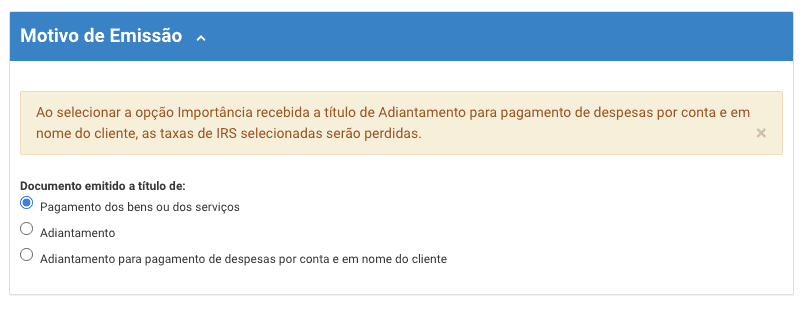
Under "Motivo de Emissão", select: Pagamento dos bens ou dos serviços
This is the normal option for completed Airbnb stays.
Do not select:
Adiantamento
Adiantamento para pagamento de despesas por conta do cliente
unless you are issuing a document before the stay occurs.
Step 5: Add the Accommodation Service
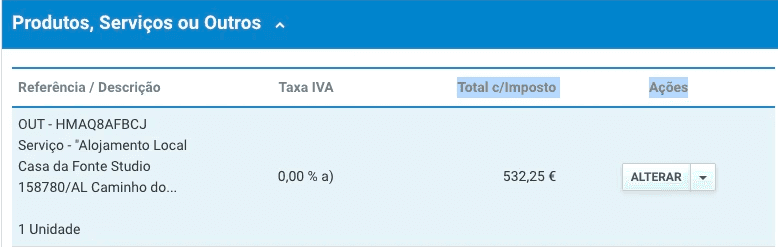
Open:
Produtos, Serviços ou Outros
Click:
Adicionar or Alterar
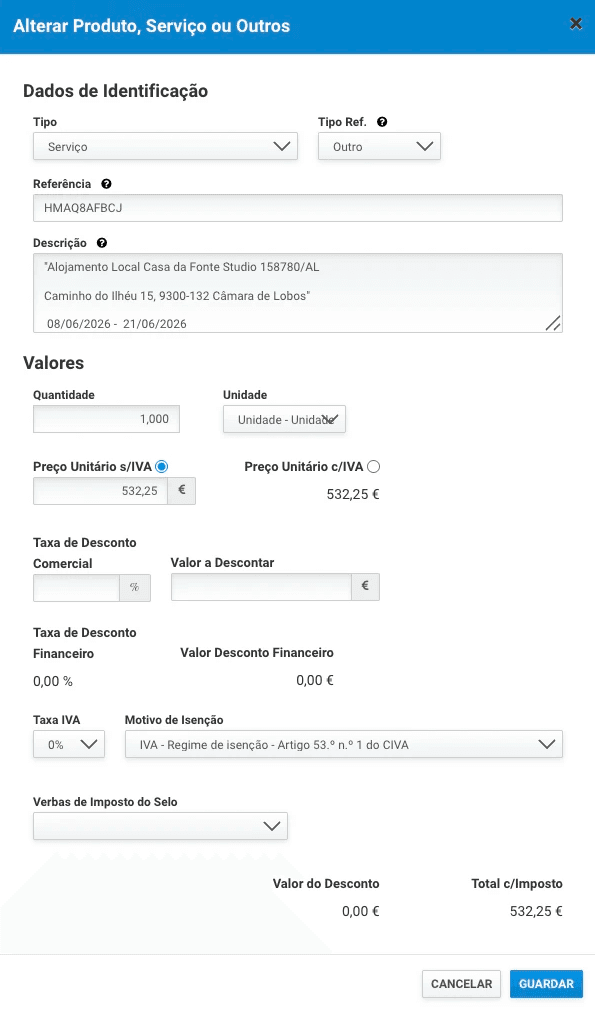
Fill in the fields as follows.
Tipo
Select: Serviço
Tipo Ref.
Select: Outro
Referência
Many hosts are unsure what to enter here. The reference is simply an internal identifier for the booking.
You can use:
Airbnb reservation code
Booking.com reservation code
Your own reservation number
Example:
HMAQ8AFBCJ
Using the reservation code makes it easier to match invoices to bookings later.
Descrição
Provide enough detail to identify the stay.
Recommended Description Template
For Airbnb reservations, we recommend:
Alojamento Local [Property Name]
AL [Licence Number]
[Check-in Date] - [Check-out Date]
Airbnb Reservation: [Reservation Code]
This makes future audits, bookkeeping, and reservation matching significantly easier.
Quantidade : 1
Unidade: Unidade
Preço Unitário
Enter only the accommodation amount.
Example: 532,25 €
Do not include tourist tax in this amount nor the commission. Commission is declared as Modelo 30.
Step 6: VAT (IVA)
If you operate under the VAT exemption regime (common for many AL hosts):
Taxa IVA
Select:
0%
Motivo de Isenção
Select:
IVA - Regime de Isenção - Artigo 53.º n.º 1 do CIVA
This is the most common exemption used by small AL operators.
Step 7: Add Tourist Tax as a Separate Line
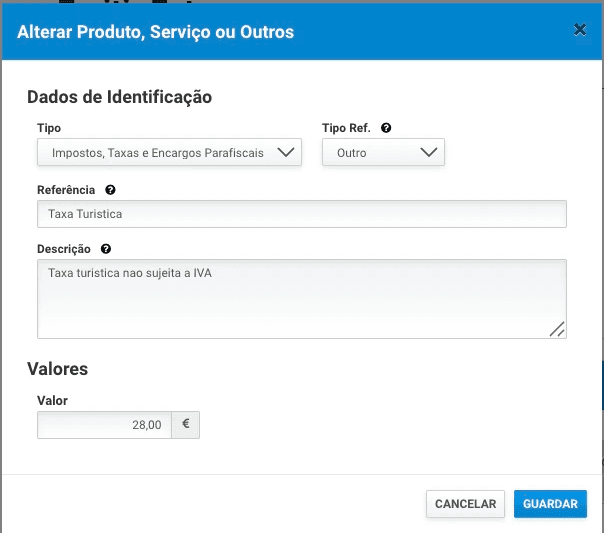
Tourist tax should appear separately from accommodation revenue.
Click:
Adicionar Produto, Serviço ou Outros
Fill in:
Tipo
Impostos, Taxas e Encargos Parafiscais
Tipo Ref.
Outro
Referência
Taxa Turística
Descrição
Taxa turística não sujeita a IVA
Valor
Example:
28,00 €
Save the line.
Why Tourist Tax Should Be Separate
The tourist tax:
Does not belong to the host
Is collected on behalf of the municipality
Is not accommodation revenue
Is generally not subject to VAT
Keeping it separate makes accounting and inspections much easier.
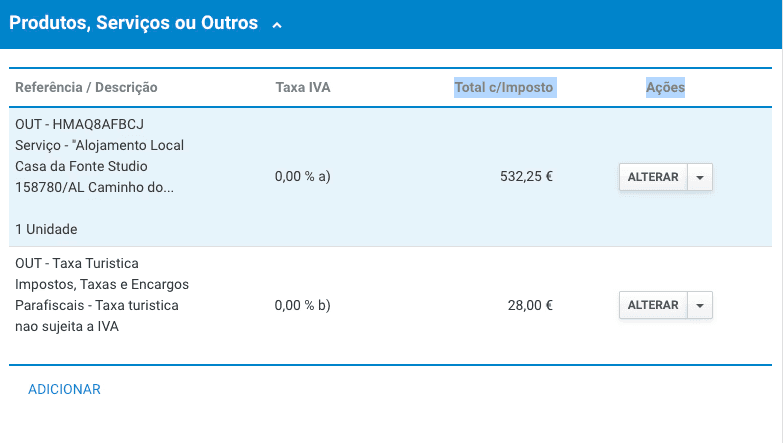
Produtos, Serviços ou Outros Section Example
Suppose your guest paid:
Referência / Descrição | Total |
|---|---|
Accommodation | €532.25 |
Tourist Tax | €28.00 |
Total | €560.25 |
The invoice should contain:
Line 1 – Accommodation
Description:
Alojamento Local Casa da Fonte Studio
AL 158780/AL
08/06/2026 - 21/06/2026
Reference:
HMAQ8AFBCJ
Amount:
€532.25
IVA:
0% – Artigo 53.º
Line 2 – Tourist Tax
Description:
Taxa Turística
Amount:
€28.00
IVA:
Not applicable
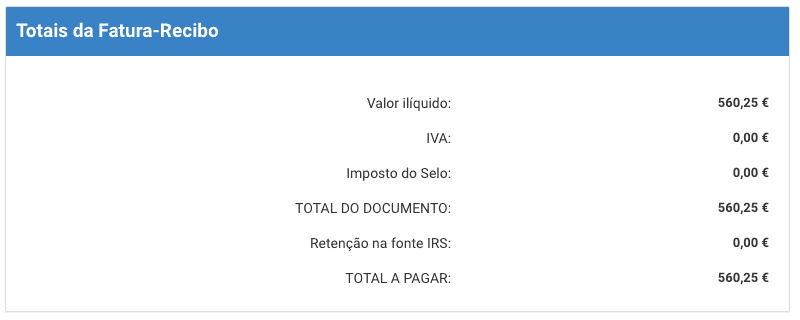
Step 8: Final Check
Once you have completed the steps below, scroll down to the last block of the invoice and confirm it has values as seen below.
Simplify Invoicing with EazyAL
If you prefer not to enter invoices manually, EazyAL can integrate with Vendus and automatically prepare invoices using your reservation and guest check-in information.
This reduces administration time and helps ensure your guest data, tourist tax, and invoicing records remain consistent.
Frequently Asked Questions
On the Finanças portal it says the service is unavailable.
Yes, the Portal das Finanças has intermittent outages, usually during maintenance or peak hours (month-end especially). Wait a few hours and try again, ideally early morning. Legally you have until the 5th working day after the service to issue the invoice, so a short outage won't put you in breach — just don't leave it to the last day.
Do I need to issue an invoice for every Airbnb or Booking.com reservation?
Yes. As an Alojamento Local host in Portugal, you should issue a Fatura or Fatura-Recibo for each booking payout received from platforms such as Airbnb or Booking.com.
What is a Fatura-Recibo?
A Fatura-Recibo is a combined invoice and receipt. It is the most common document used by Airbnb and Booking.com hosts because the platform has already collected the payment from the guest and transferred it to the host.
Can I issue invoices directly on the AT (Finanças) website?
Yes. You can issue invoices directly through Portal das Finanças free of charge. Many hosts use this method, especially when managing a small number of reservations.
Do I need invoicing software like Vendus?
No. Vendus is optional. You can create invoices manually on the AT portal. However, software such as Vendus can save time by automating invoice creation and reducing manual data entry.
What information do I need before creating an invoice?
You should have:
Guest name
Guest country of residence
Guest tax number, passport number, or ID number
Reservation code
Check-in and check-out dates
Accommodation amount
Tourist tax amount
AL licence number
What should I enter in the "NIF ou equivalente" field?
For Portuguese guests, enter their Portuguese NIF.
For foreign guests, enter their foreign tax number, passport number, or identification number if available.
What should I select under "Motivo de Emissão"?
For completed Airbnb or Booking.com stays, select:
Pagamento dos bens ou dos serviços
This is the standard option for accommodation services already provided.
What is the "Referência" field?
The reference is an internal identifier that helps you identify the reservation later.
Examples include:
Airbnb reservation code
Booking.com reservation code
Your own booking reference
Example:
HMAQ8AFBCJ
Using the reservation code makes future bookkeeping and audits easier.
What should I write in the description?
Include enough information to identify the stay.
Recommended format:
Alojamento Local [Property Name]
AL [Licence Number]
[Check-in Date] - [Check-out Date]
Airbnb Reservation: [Reservation Code]
What quantity should I use?
For most bookings:
Quantidade = 1
Unidade = Unidade
The reservation is treated as a single accommodation service.
Should I include tourist tax in the accommodation amount?
No.
The accommodation amount and tourist tax should appear as separate lines on the invoice.
Why should tourist tax be shown separately?
Tourist tax:
Does not belong to the host
Is collected on behalf of the municipality
Is not accommodation revenue
Is generally not subject to VAT
Keeping it separate makes accounting and municipal reporting easier.
How do I add tourist tax to the invoice?
Create a second line under "Produtos, Serviços ou Outros" and use:
Tipo: Impostos, Taxas e Encargos Parafiscais
Tipo Ref.: Outro
Referência: Taxa Turística
Descrição: Taxa turística não sujeita a IVA
Enter the tourist tax amount collected from the guest.
Should tourist tax have VAT applied?
Generally, no.
Tourist tax is usually shown separately and is not subject to VAT because it is collected on behalf of the municipality.
What VAT rate should I select for accommodation?
If you operate under the VAT exemption regime:
Taxa IVA: 0%
Motivo de Isenção: IVA - Regime de Isenção - Artigo 53.º n.º 1 do CIVA
If you are VAT registered, consult your accountant regarding the correct VAT treatment.
Can I issue one invoice for multiple guests staying together?
Yes.
Normally, one invoice is issued per reservation, not per guest.
The invoice is usually issued to the lead guest who made the booking.
What date should I use on the invoice?
Use the appropriate transaction date based on when the accommodation service was provided and your accounting obligations.
If you are unsure, consult your accountant.
Do I need to include my AL licence number?
Yes, it is highly recommended.
Including the AL licence number helps identify the property and simplifies future audits and bookkeeping.
What are the most common invoicing mistakes made by AL hosts?
Including tourist tax in the accommodation amount
Forgetting the AL licence number
Using incorrect reservation dates
Applying the wrong VAT treatment
Issuing separate invoices for every guest in a group
Using vague descriptions that do not identify the booking
Can EazyAL automate invoicing?
Yes.
EazyAL can integrate with Vendus to automatically prepare invoices using reservation and guest check-in data.
This reduces manual work, helps avoid errors, and keeps guest reporting, tourist tax, and invoicing records consistent.