Automate SIBA for Alojamento Local and Avoid Fines 2026
If you rent out a property in Portugal through Airbnb or Booking.com, you already know that every guest stay comes with a legal obligation: you must report your guest's identification data to the Portuguese authorities — specifically to SIBA (Sistema de Informação de Boletins de Alojamento), managed by AIMA (Agência para a Integração, Migrações e Asilo) — within three days of check-in. Miss that window, and you risk fines and legal liability.
The problem? Doing this manually for every booking is time-consuming, repetitive, and easy to forget. EazyAL was built to solve exactly this — automating the entire flow from guest check-in to SIBA/AIMA confirmation without you lifting a finger.
Here's exactly how it works, step by step.
Step 1: Setting Up Your Check-In Link
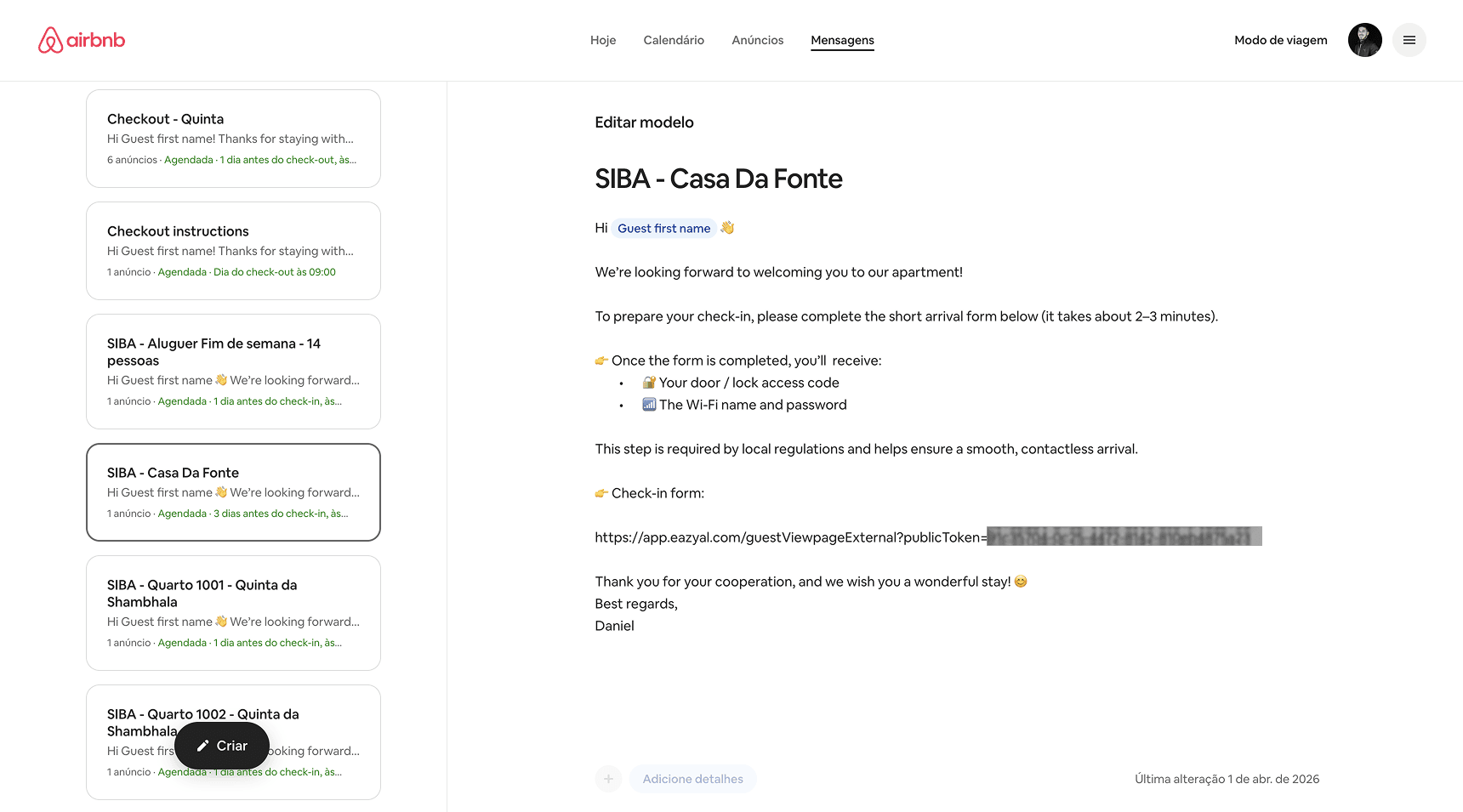
Before anything can be automated, there's one simple action you need to take as a host: add your unique EazyAL check-in link to your pre-arrival messaging on Airbnb or Booking.com.
EazyAL generates a unique link for each property in your account. This link points to a secure, branded guest check-in form. Once you have it, you paste it into your platform's scheduled messaging system:
On Airbnb, go to your inbox settings and add it to your automated scheduled messages — typically sent 24 to 48 hours before arrival.
On Booking.com, add it to your automated message templates in the Messaging section of your property settings.
That's it. You only need to do this once per property. From that point on, every incoming guest receives the link automatically before they arrive — no manual sending required on your part.
Step 2: The Guest Receives the Message and Completes the Form
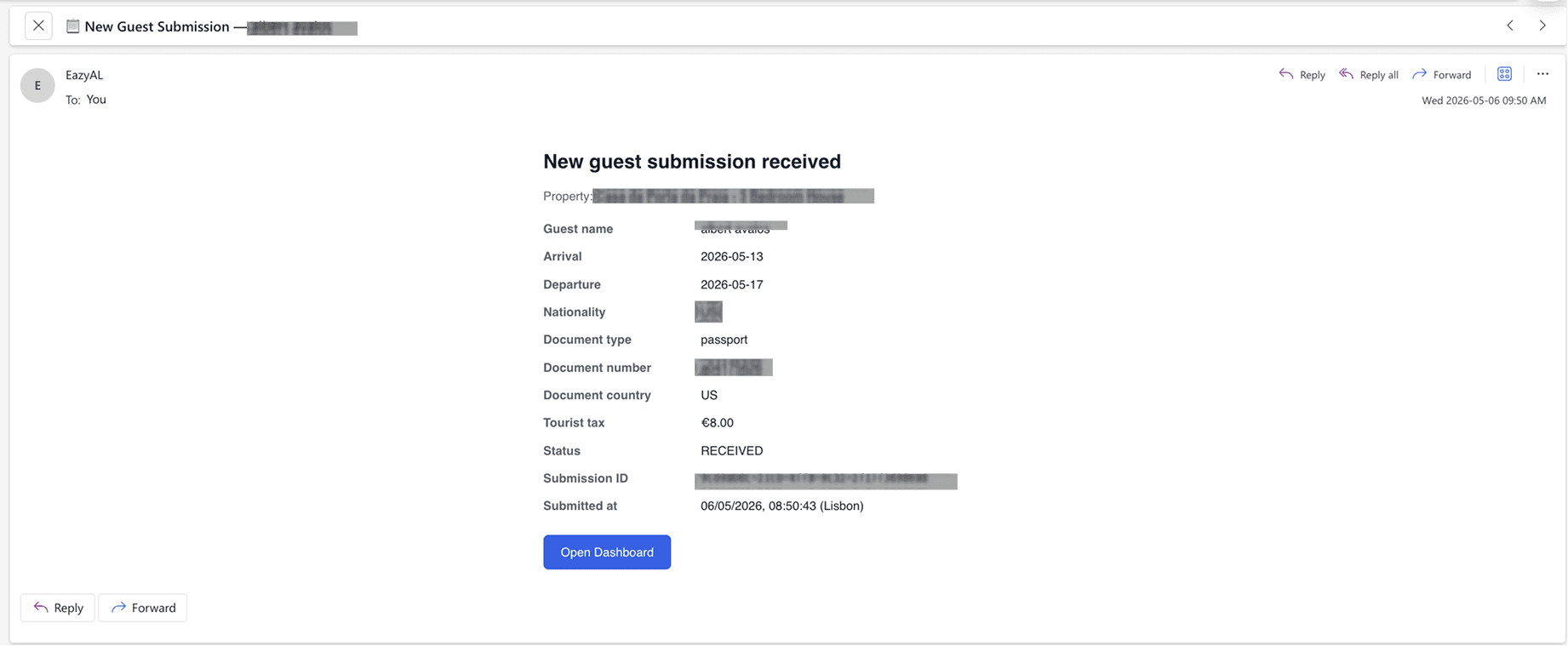
When a guest books your property, your platform automatically sends them the pre-arrival message containing the EazyAL check-in link. The message typically reads something like:
"To prepare your check-in, please complete the short arrival form below (it takes about 2–3 minutes). Once completed, you'll receive your door/lock access code and the Wi-Fi name and password. This step is required by local regulations and helps ensure a smooth, contactless arrival."
The guest clicks the link and is taken to a clean, branded form — displaying your property name — that asks for:
Passport or ID details (document type, number, and issuing country)
Nationality and country of residence
Arrival and departure dates
The form is mobile-friendly and takes under three minutes to complete. If you're expecting multiple guests, each person can complete the same form individually — there's no need to share separate links.
Once the guest submits, they receive confirmation that the form is done, and your access code or Wi-Fi details can be conditionally released, giving you a seamless, contactless check-in experience.
Step 3: You Receive an Instant Notification Email
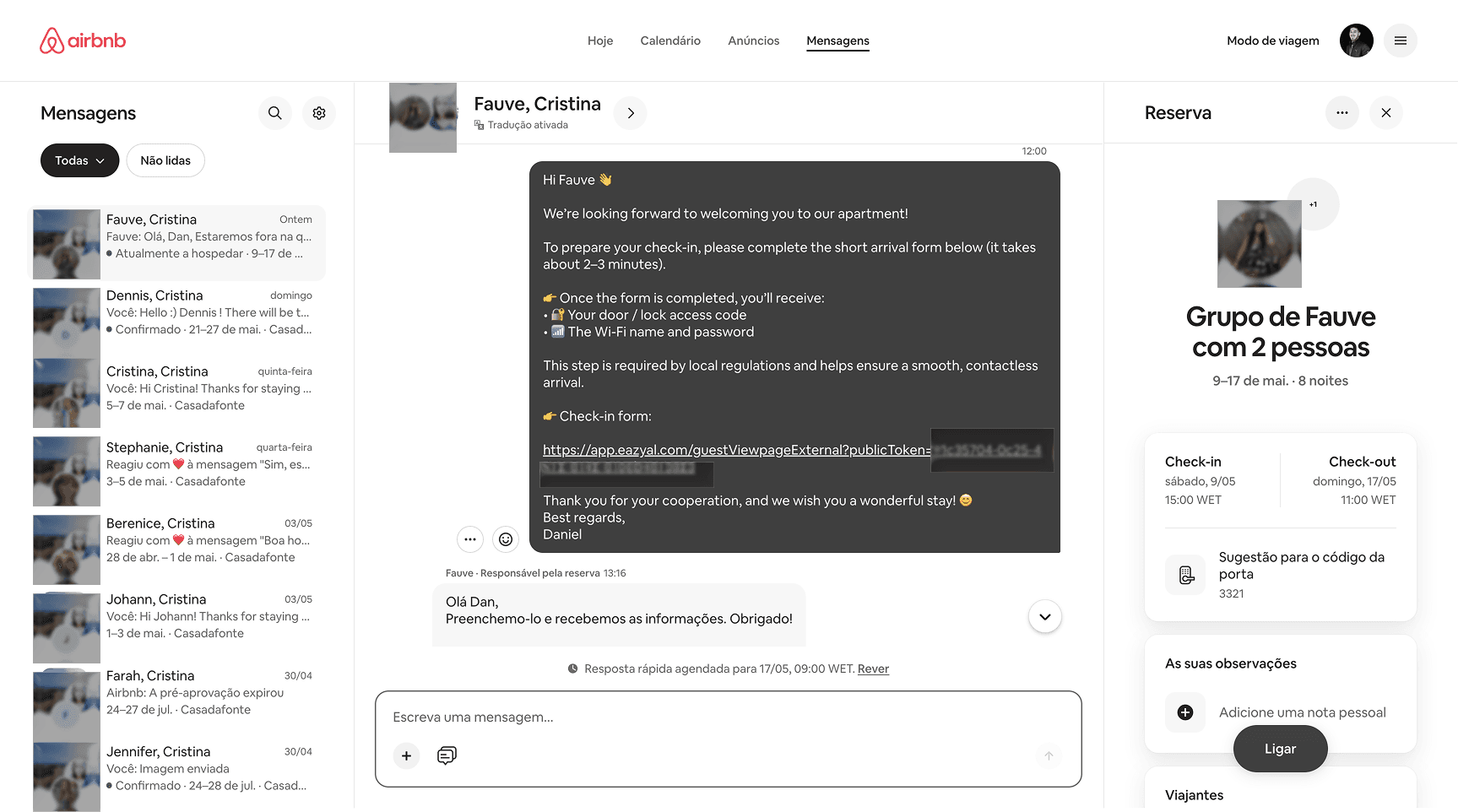
The moment a guest submits their check-in form, EazyAL sends you — the host — an automatic notification email. This email includes:
Guest full name
Arrival and departure dates
Nationality and document type
Document number (partially masked for privacy)
Issuing country
Tourist tax amount calculated for the stay
Submission status: RECEIVED
A unique Submission ID and timestamp
This email serves as your real-time confirmation that a guest has completed their registration. You don't need to log into any dashboard to know a submission came in — it arrives directly in your inbox.
Step 4: The Submission Appears in Your EazyAL Dashboard
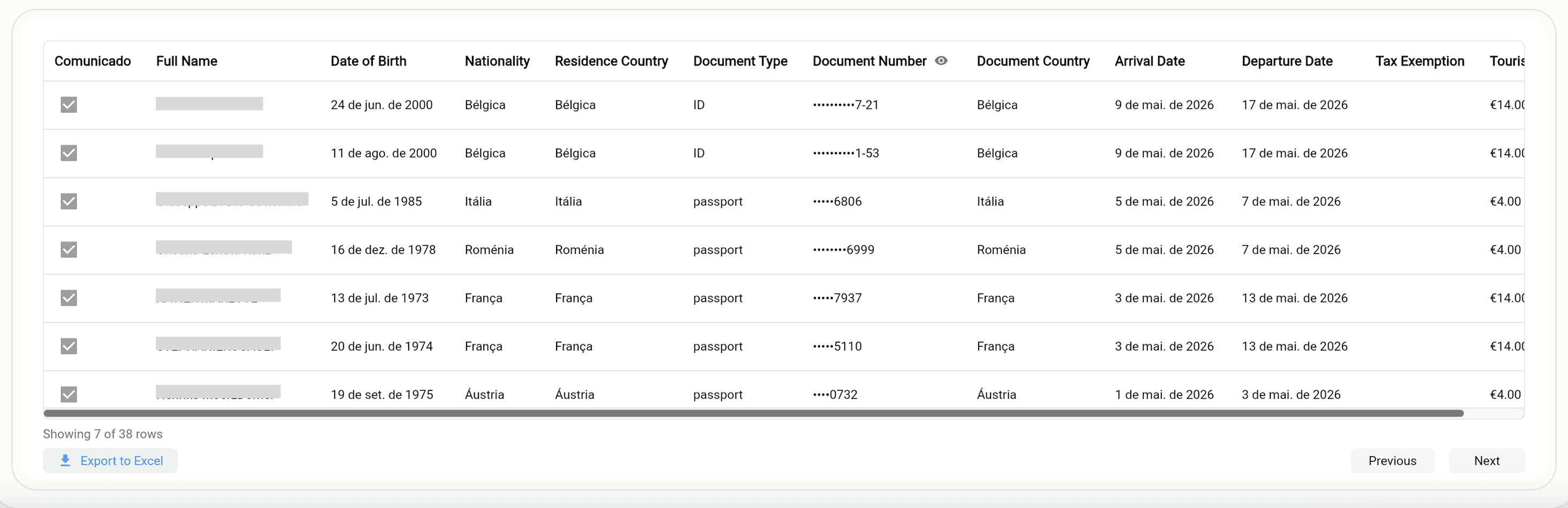
All guest submissions are also recorded in your EazyAL dashboard under the SIBA/AIMA Bulletins section. Here you can see, at a glance:
Full guest details — name, date of birth, nationality, document type and number
Stay dates — arrival and departure
Tourist tax — the amount applicable to each stay
Communication status — whether the submission has been sent to SIBA/AIMA or is pending
The dashboard gives you a complete, chronological record of every guest who has registered through your property — a built-in audit trail that proves compliance if you're ever questioned.
Step 5: EazyAL Automatically Sends the Bulletin to SIBA/AIMA
This is where the real automation happens.
Within the legal reporting window — up to three days after the guest's check-in date — EazyAL's system automatically:
Validates the guest's submitted data to ensure it meets SIBA/AIMA requirements
Prepares the accommodation bulletin (boletim de alojamento) in the correct format
Submits the bulletin directly to SIBA via the official API
You do not need to log into the SIBA portal. You do not need to manually fill in any form. You do not need to remember to submit before the deadline. EazyAL handles all of it automatically, in the background.
This is the core value of EazyAL: the legal obligation is met without any action on your part beyond the initial setup.
Step 6: SIBA/AIMA Confirms — And You Know It's Done
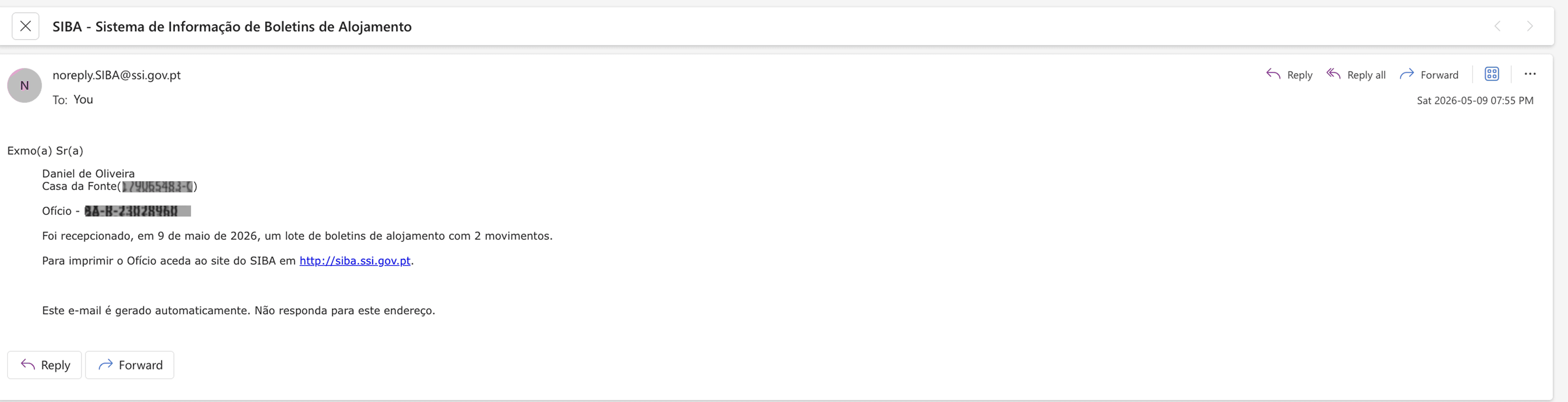
After EazyAL submits the bulletin, SIBA/AIMA processes it and returns a batch confirmation — an official reference number (e.g., BA-R-XXXXXXXX) — confirming that the submission was received and accepted.
This confirmation appears in two places:
Your EazyAL dashboard, where each guest's communication status updates from Pending to Communicated, with a green status indicator.
Optionally, the SIBA portal itself, where you can cross-reference the batch reference number if you want independent verification.
You know it's done when you see "Comunicado" (Communicated) next to a guest's record in your dashboard. That status means SIBA/AIMA has accepted the bulletin, the legal obligation has been fulfilled, and there is nothing further for you to do.
Why This Matters for Portuguese Hosts
Portugal's short-term rental market operates under strict regulatory requirements. The SIBA/AIMA reporting obligation applies to every licensed accommodation unit — whether you manage one property or twenty. Non-compliance can lead to fines, and with local authorities increasingly scrutinising the sector, maintaining a clean record matters.
EazyAL was designed specifically for this market. It doesn't just simplify the process — it eliminates the possibility of forgetting. Because the submission happens automatically within the legal window, every booking is covered without any ongoing effort on your part.
Getting Started
The setup takes less than five minutes:
Log into EazyAL and find your property's unique check-in link
Paste the link into your Airbnb or Booking.com automated pre-arrival message
That's it — EazyAL takes care of everything from the moment your next guest arrives
From then on, every check-in triggers the full flow: guest registration, automatic SIBA/AIMA submission, and confirmed compliance — all with no manual work required.
EazyAL is built exclusively for Portugal's short-term rental market, covering SIBA/AIMA guest registration, tourist tax calculation, and INE/IPHH statistical reporting — all in one platform.