Airbnb Earnings to Modelo 30 for Alojamento Local

Airbnb hosts in Portugal may need to report certain payments made to non-resident companies through Modelo 30.
For Airbnb hosts, one of the most relevant amounts is normally the Airbnb service fee or commission charged on each reservation.
The important point is that you should not simply take the total Airbnb service fees from the monthly earnings report and enter them as one payment in EazyAL.
Instead, in EazyAL you should create a separate payment for each Airbnb booking in Modelo 30 → Transaction History.
This makes it possible to keep the individual commission amounts and payment dates connected to the bookings that generated them.
This guide explains how to:
Find the Airbnb service fee for each booking.
Create a payment in EazyAL for each reservation.
Use Airbnb's monthly report to reconcile the total.
Complete the accountant-confirmed Modelo 30 information.
Export the resulting XML for validation and submission through Portal das Finanças.
EazyAL helps prepare, organise and check the information. It does not determine your tax treatment or submit the declaration to AT.
1. Find the Airbnb service fee for each booking
Start from your Airbnb earnings or transaction history and open the details for an individual reservation.
For example, a booking may show:
Airbnb field | Amount |
|---|---|
€97.90 × 6 nights | €587.40 |
Cleaning fee | €65.00 |
Service fee | −€124.38 |
Taxes | €12.00 |
For Modelo 30 preparation in EazyAL, the relevant amount from this example is the €124.38 Airbnb service fee.
Enter the amount in EazyAL as a positive value: €124.38.
Airbnb displays the fee as −€124.38 because it is deducted from your earnings. In EazyAL, you are recording the value of the service or commission paid to Airbnb, so it is entered as a positive amount.
Do not use:
The €587.40 accommodation revenue.
The €65 cleaning fee charged to the guest.
The €12 tax amount.
The total amount earned from the reservation.
The amount being recorded is the Airbnb service fee charged for that booking, subject to confirmation of the correct tax treatment with your accountant.
2. Create one EazyAL payment for each Airbnb booking
In EazyAL, open the relevant property and go to:
Compliance Hub → Modelo 30 → Transaction History
Select Add payment and create a payment for the Airbnb commission associated with that reservation.
For the example above:
EazyAL field | Example value |
|---|---|
Platform | Airbnb |
Supplier | Airbnb Ireland UC |
Residence country | IRL |
Service / commission amount | €124.38 |
Currency | EUR |
Payment date | Date applicable to that transaction |
Withholding | Accountant-confirmed value |
Then select Save payment.
If you had 10 Airbnb bookings during the month, you would normally have 10 Airbnb payment entries in EazyAL's transaction history, rather than one entry containing the month's combined Airbnb fees.
For example:
Booking | Airbnb service fee | EazyAL transaction |
|---|---|---|
Booking 1 | €124.38 | Payment 1 |
Booking 2 | €68.42 | Payment 2 |
Booking 3 | €91.70 | Payment 3 |
Booking 4 | €54.90 | Payment 4 |
EazyAL can then use these individual transactions when preparing the Modelo 30 draft for the relevant reporting period.
3. Why payments should be recorded booking by booking
Airbnb's monthly earnings report is useful because it gives you an overview of your activity for the month.
However, the monthly figure is an aggregate.
For example, your July report might show:
Airbnb service fees: −€494.50
That does not mean you should create a single €494.50 Airbnb payment in EazyAL.
Instead, the €494.50 should be the result of the individual service fees charged across the Airbnb reservations included in that period.
For example:
€124.38 + €68.42 + €91.70 + €54.90 + €155.10 = €494.50
Each amount should exist separately in EazyAL's transaction history.
The monthly total can then be used as a useful reconciliation check to confirm that the individual Airbnb fees recorded in EazyAL agree with Airbnb's report.
4. Download the monthly Airbnb earnings report for reconciliation
Airbnb automatically creates monthly and annual earnings reports.
On Airbnb's desktop website:
Open Today.
Select Menu → Earnings.
Under Earnings reports, choose View all reports.
Open the relevant month.
Select Get PDF report.
Choose Download PDF.
Select Download.
See Airbnb's official earnings-report guide.
If you manage several listings, check that you are looking at the correct property.
You can also use Airbnb's transaction-level reporting when you need to investigate individual bookings, payouts or service fees in more detail.
The objective is simple:
Individual Airbnb bookings → individual EazyAL transactions → monthly Airbnb report used to confirm the total.
5. Confirm the payment date
The Airbnb earnings summary alone does not necessarily establish which date should be used as the relevant payment or availability date for Modelo 30.
For each transaction, EazyAL therefore asks for a payment date.
Use the date supported by the relevant Airbnb transaction, payout or accounting evidence and confirm the appropriate treatment with your accountant.
This is another reason why recording Airbnb fees individually is preferable to entering one monthly total: different transactions can potentially have different relevant dates.
6. Confirm the information Airbnb does not provide in the booking breakdown
The Airbnb booking earnings screen tells you the amount of the service fee, but it does not by itself establish all of the information required for Modelo 30.
Depending on your circumstances, you may also need to confirm information such as:
Supplier legal identity.
Supplier country of residence.
Portuguese or AT-assigned beneficiary tax number.
Modelo 30 income code.
Applicable taxation-regime code.
Withholding amount.
Declarant information.
Relevant payment date.
Selecting Airbnb in EazyAL can help organise the transaction, but you should still review the information used for the declaration.
Airbnb provides Portuguese hosts with tax information relating to Airbnb Ireland UC, including access to its RFI-21 documentation.
See Airbnb's Portugal tax information.
Whether a double-taxation convention applies and whether withholding should be reduced or eliminated should be confirmed with your accountant.
7. Review your Transaction History before preparing Modelo 30
Once you have entered the Airbnb payments for the month, open:
Compliance Hub → Modelo 30 → Transaction History
Check that:
Every relevant Airbnb booking has a corresponding payment.
The service-fee amount matches Airbnb.
There are no duplicate bookings.
The correct property is associated with each payment.
Payment dates are correct.
Supplier information is complete.
The month's combined transactions reconcile with Airbnb's earnings report.
For example, if Airbnb's July report says:
Service fees: €494.50
your Airbnb transactions in EazyAL for the corresponding period should reconcile to approximately the same underlying amount, subject to any timing differences or adjustments.
Do not create another €494.50 transaction simply to make the total match.
8. Create the Modelo 30 draft
Once the individual payments have been entered, go to:
Compliance Hub → Modelo 30
Choose the relevant reporting period and declaration type.
For example:
Month: July
Year: 2026
Declaration: 01 · Initial declaration
EazyAL uses the payments recorded in Transaction History to help build the declaration.
Before exporting, review the transactions and complete any required accountant-confirmed information.
9. Complete the accountant-confirmed fields
Before XML export, make sure the required filing information is complete, including where applicable:
Declarant NIF.
Tax-office code.
Beneficiary Portuguese or AT-assigned NIF ( 712026681)
Residence-country code.
Income code.
Taxation-regime code.
Withholding amount.
Declaration type.
Other fields required for the specific filing.
For example:
Airbnb Ireland UC
Ireland — IRL / 372
Foreign TIN — 9827384L / 712026681
Income type — 08 · Comissões
Tax regime — 02 · Double Taxation Treaty
Commission — €124.38
Withholding — €0.00, assuming valid RFI-21 documentation
Payment date — Airbnb transaction/payout date for that booking
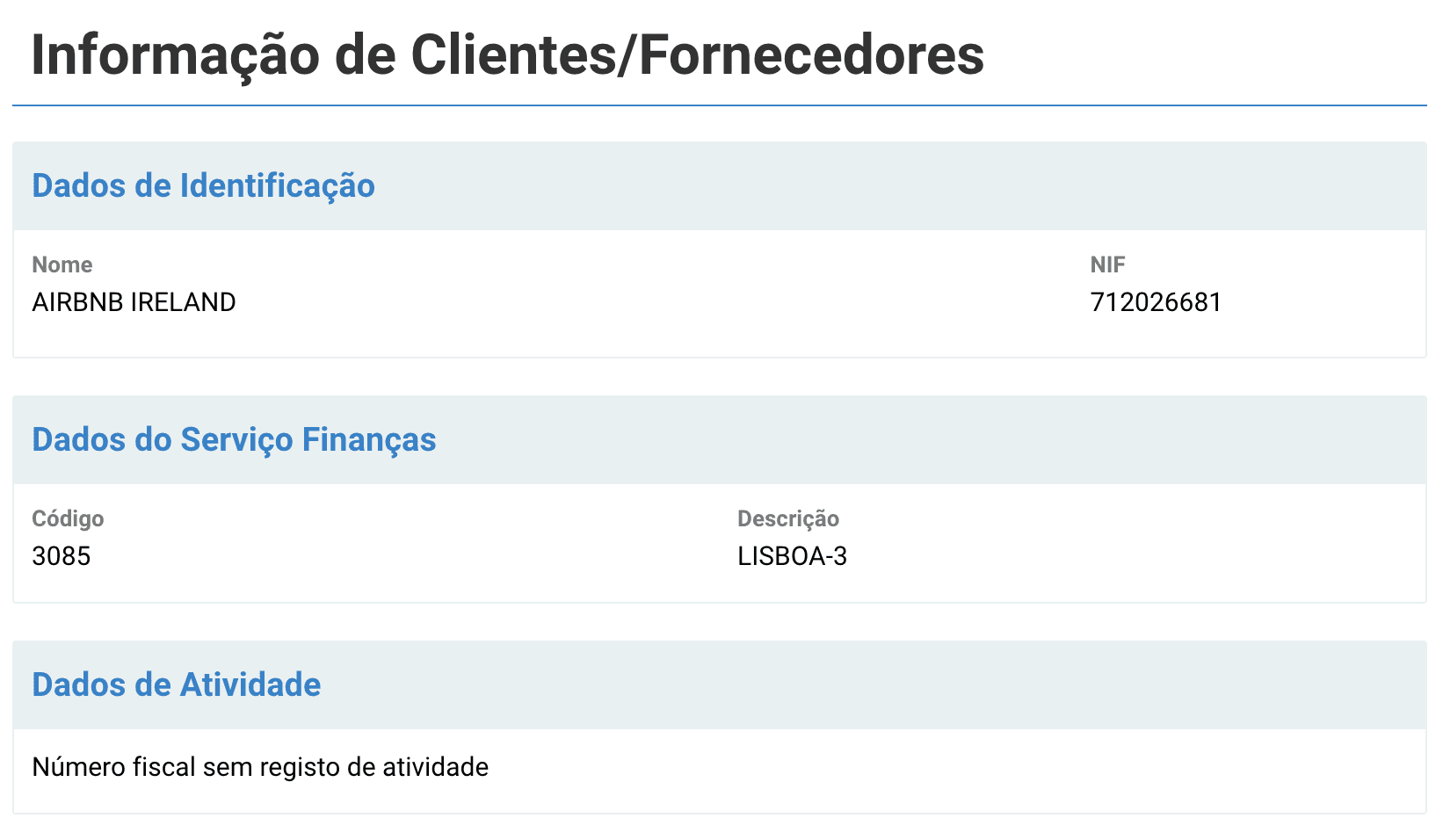
The official AT Modelo 30 instructions contain the available income and taxation-regime codes.
Because the appropriate codes and tax treatment depend on the circumstances, EazyAL does not determine them for you. Read the official Modelo 30 instructions.
10. Export, validate and submit
Once all required information is complete:
Select Export AT XML in EazyAL.
Open the file using AT's current Modelo 30 validator.
Review any validation errors.
Correct the information in EazyAL.
Export the XML again if necessary.
In Portal das Finanças, open the Modelo 30 submission area.
Upload the validated file.
Check the status of the declaration afterward.
Mark the declaration as submitted in EazyAL only after confirming its acceptance.
Use the official AT Modelo 30 downloads page for the current software and validation tools.
Modelo 30 is generally submitted by the end of the second month following the relevant payment or availability event. The specific event that determines the reporting period should be confirmed with your accountant.
Example: one Airbnb booking from start to finish
Imagine Airbnb shows the following earnings for a six-night reservation:
Accommodation
€97.90 × 6 nights = €587.40
Cleaning fee
€65.00
Airbnb service fee
−€124.38
Taxes
€12.00
For EazyAL, you create one transaction for that booking:
Platform: Airbnb
Service amount: €124.38
Currency: EUR
Payment date: Relevant transaction date
Supplier: Airbnb entity applicable to the transaction
Residence: Accountant/official-document-confirmed country
Tax information: Completed according to the applicable treatment
You then repeat the same process for the next Airbnb reservation.
At the end of the month, instead of manually creating one large Airbnb commission entry, EazyAL already contains the individual transactions that make up the month's activity.
Conclusion
The easiest way to think about Airbnb and Modelo 30 in EazyAL is:
One Airbnb booking → one Airbnb service fee → one payment in EazyAL Transaction History.
Do not simply copy the combined monthly Airbnb service-fee figure into EazyAL as one payment.
Use Airbnb's individual reservation details to record each transaction, and use the monthly earnings report afterward to reconcile the total.
This gives you a clearer audit trail, makes individual transactions easier to verify, and allows EazyAL to turn your booking-level information into a structured Modelo 30 draft.
Prepare your Airbnb transactions from EazyAL's Modelo 30 Transaction History.
This guide is educational and does not replace advice from a certified accountant or the Portuguese Tax Authority (AT). The existence of a Modelo 30 obligation, relevant payment date, reportable amount, VAT treatment, withholding treatment, tax codes and beneficiary identification depend on the circumstances of each taxpayer.